
Explore The Best AI Websites & Tool
Your all-in-one toolkit for productivity, creativity, and development. Over 40 powerful tools to streamline your workflow.
SearchHow to Use SLIDESGO: A Comprehensive Guide for Presentations
Introduction to SLIDESGO
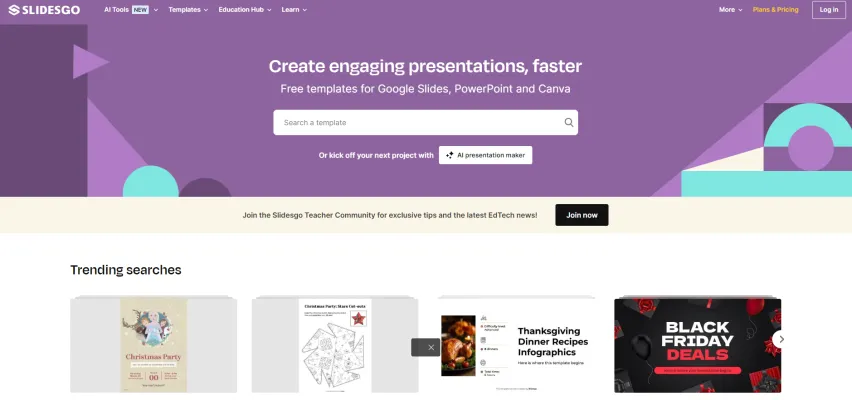
Slidesgo is a comprehensive online platform that offers a vast collection of free and premium presentation templates for Google Slides and PowerPoint. Designed to simplify the presentation creation process, Slidesgo provides users with professionally crafted templates categorized by industry, style, and color, making it easy to find the perfect design for any presentation.
In addition to its extensive template library, Slidesgo integrates advanced AI tools that assist users in generating presentations, converting PDF files to PowerPoint, and creating lesson plans. This allows educators and professionals to save time and enhance the quality of their presentations. The platform also features a dedicated Education Hub, offering tailored templates for various academic needs, making it particularly useful for teachers and students.
With options for both free downloads and a premium subscription for unlimited access, Slidesgo is a valuable resource for anyone looking to create engaging and visually appealing presentations quickly and efficiently. Its user-friendly interface and commitment to education further solidify its position as a go-to tool for presentation needs.
Use Cases of SLIDESGO
Slidesgo's versatility makes it an invaluable tool for various professionals and industries. Here are some key use cases:
- Medical Presentations: Slidesgo offers templates tailored for medical professionals, perfect for clinical case reports and health presentations. These designs help present complex medical data clearly and engagingly.
- Educational Resources: Educators can create engaging lesson plans, workshops, and infographics using Slidesgo's extensive library. The platform categorizes templates by subject and school level, catering to all educational needs.
- Business Proposals: Professionals can create visually appealing pitch decks and project proposals using Slidesgo's professional designs, increasing the likelihood of impressing clients and stakeholders.
- Marketing Campaigns: Marketing teams benefit from templates designed for social media campaigns, newsletters, and promotional materials, effectively communicating branding messages.
- Creative Projects: Artists and designers can showcase their work using Slidesgo's unique and customizable designs, perfect for portfolios and presentations.
How to Access SLIDESGO
Accessing Slidesgo is a straightforward process:
- Open your preferred web browser.
- Enter https://slidesgo.com in the address bar.
- Browse templates by category or use the search bar.
- Sign up or log in to download templates.
- Choose a template and download it for Google Slides or PowerPoint.
How to Use SLIDESGO
To make the most of Slidesgo's features:
- Sign Up: Register for a free account at Slidesgo.com.
- Browse Templates: Navigate the "Templates" section, filtering by industry, style, or color.
- Download a Template: Select a template and choose the Google Slides or PowerPoint option.
- Customize Your Template: Edit the downloaded template, replacing placeholder text and images with your content.
- Utilize Tutorials: Check out "Slidesgo School" for tips on effective presentation design.
How to Create an Account on SLIDESGO
Creating a Slidesgo account is simple:
- Visit slidesgo.com.
- Click "Register" in the top-right corner.
- Fill in your details (full name, email, password).
- Accept the Terms of Service and Privacy Policy.
- Click "Register" to create your account.
- Verify your email by clicking the link sent to your inbox.
- Log in to access your new account.
Tips for Using SLIDESGO
To maximize your Slidesgo experience:
- Explore the Template Library: Take advantage of the extensive collection organized by industry, style, and color.
- Utilize AI Tools: Leverage Slidesgo's AI-powered tools for presentation making and lesson plan generation to streamline your content creation process.
- Customize Your Slides: Modify templates to align with your branding or personal style. Remember, all templates are fully editable.
- Incorporate Visual Elements: Use integrated icons from Flaticon and other graphic resources to enhance your slides visually.
- Learn from Resources: Visit Slidesgo School for tutorials and presentation tips to improve your skills and make the most of the platform's features.
By following these guidelines and tips, you'll be well-equipped to create impressive, engaging presentations using Slidesgo. Whether you're a teacher, business professional, or creative individual, Slidesgo offers the tools and resources to elevate your presentation game. With its user-friendly interface, extensive template library, and AI-powered features, Slidesgo stands out as a comprehensive solution for all your presentation needs. Start exploring Slidesgo today and transform your ideas into visually stunning presentations that captivate your audience and effectively convey your message.
Trending


MyTunes: AI Music Generator Review | Revolutionize Music
Discover how MyTunes AI Music Generator is transforming music creation. Explore features, benefits, and alternatives in our comprehensive guide.
How to Choose the Best AI Tools Directory
Discover how to choose the best AI tools directory with our comprehensive guide. Learn about essential features, top directories, and why you need an AI tools directory today.

OpenAI's Strawberry: The Next Leap in AI Reasoning
This article explores OpenAI's secretive "Strawberry" project, a groundbreaking AI model aimed at enhancing reasoning capabilities and autonomous research.

ChatGPT Mobile App Hits Record-Breaking Revenue in July 2024
OpenAI's ChatGPT mobile app achieves its highest monthly revenue to date, signaling growing demand for AI-powered conversational tools and setting new benchmarks in the AI industry.

AI News Roundup for October 17, 2024: Mistral's Edge AI Models, NVIDIA's Breakthroughs, and More | AIPURE
Discover the latest advancements in AI with AIPURE's roundup for October 17, 2024. Explore Mistral's new edge AI models, NVIDIA's performance enhancements, and innovative solutions for accessibility. Stay informed about how these developments are shaping the future of artificial intelligence.